What Really Happens to a File When You Delete It
By Charles York on June 25, 2026
Deleting a file feels simple. You select it, press the delete key, empty the recycle bin, and assume it’s gone forever. But behind the scenes, something very different happens.
In most cases, a deleted file doesn’t immediately disappear from your device. Instead, the operating system simply changes how it keeps track of that file. This is why deleted files can often be recovered, sometimes even long after they’ve been removed.
Understanding what really happens when you delete a file reveals a surprising side of how computers store information.
The file isn’t immediately erased
When you save a file, your device stores its data in specific locations on a hard drive or solid-state drive. At the same time, the operating system creates a record that tells it where that data is located.
Think of it like a library catalog. The catalog tells you where a particular book can be found on the shelves.
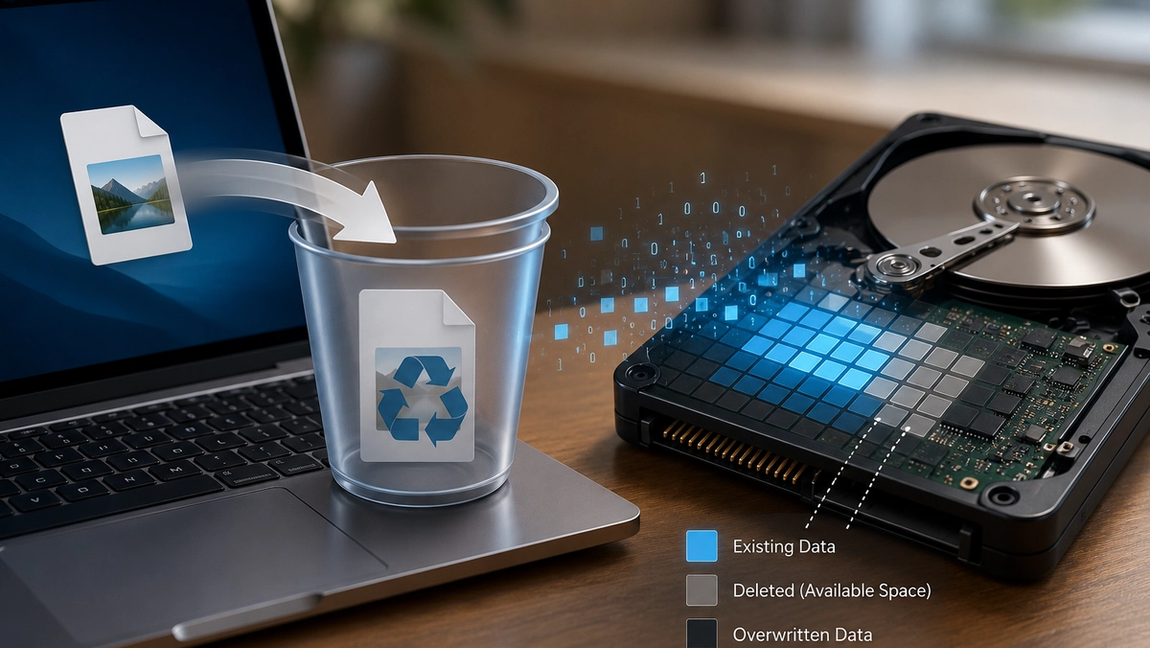
When you delete a file, the operating system usually removes the catalog entry rather than immediately destroying the book itself. The file’s data often remains on the storage device, but the system marks that space as available for future use.
As far as your computer is concerned, the file is gone because it no longer knows where to find it. However, the underlying data may still exist.
Why deleted files can sometimes be recovered
Because the actual data often remains untouched after deletion, recovery software can sometimes locate and restore deleted files.
These programs scan the storage device looking for pieces of data that still exist but are no longer listed in the file system. If the original data hasn’t been overwritten, recovery tools may be able to rebuild the file.
This is why experts often recommend stopping the use of a drive immediately after accidentally deleting something important. The more you use the device, the greater the chance that new data will overwrite the deleted file.
Once that happens, recovery becomes much more difficult—or impossible.
What happens when you empty the recycle bin?
Many people assume that emptying the recycle bin permanently destroys files.
In reality, this step usually just removes another layer of references to the file. The operating system no longer keeps track of the deleted item, and the storage space becomes available for reuse.
The data itself may still remain on the drive until new files occupy the same storage locations.
This means that a file removed from the recycle bin is often harder to recover than one still sitting inside it, but it may not be completely gone yet.
The exact behavior depends on the operating system and storage technology being used.
Hard drives and SSDs handle deletion differently
Traditional hard disk drives (HDDs) store data magnetically on spinning disks. When files are deleted, the data often remains intact until another file eventually overwrites those sectors.
Solid-state drives (SSDs), which are used in most modern laptops and smartphones, work differently.
Many SSDs use a feature called TRIM. When a file is deleted, TRIM informs the drive that certain blocks of data are no longer needed. This allows the SSD to clean up unused space more efficiently and maintain performance.
As a result, deleted files on SSDs may become unrecoverable much faster than files on traditional hard drives.
Is deleted data a security risk?
It can be.
If you simply delete files before selling, donating, or disposing of a device, sensitive information may still be recoverable under certain circumstances.
That’s why businesses and organizations often use secure data-erasure methods when retiring equipment. These methods overwrite storage locations multiple times or use built-in secure erase functions designed to make recovery impossible.
Modern smartphones and computers also frequently use encryption. In encrypted systems, even if some deleted data remains physically present, it may be unreadable without the proper encryption key.
This adds an important layer of protection for personal information.
Can deleted files ever be gone forever?
Yes.
Eventually, deleted data is usually overwritten by new information. Once enough of the original data has been replaced, recovery becomes impossible.
Some secure deletion tools intentionally overwrite files immediately to ensure they cannot be restored later. Similarly, many modern SSDs permanently clear deleted data relatively quickly due to their internal management processes.
At that point, the file truly disappears.
Why deletion works this way
At first glance, it may seem strange that computers don’t immediately erase deleted files. The reason is efficiency.
Actually erasing every bit of data the moment you delete a file would take additional time and resources. It’s much faster for the operating system to simply mark the space as available and reuse it later when needed.
This approach allows computers to delete files almost instantly while keeping storage operations efficient.
The next time you drag a file into the recycle bin, remember that pressing “delete” usually doesn’t destroy the data right away. Instead, your device is simply removing the directions that point to it, leaving the actual information behind until that space is needed for something new.